For site owners

Run the marketplace. Keep the commission.

You own the platform, set the rate, approve the sellers and hold the payouts. No revenue share to us, no per-transaction fee, no account that can be closed from outside.

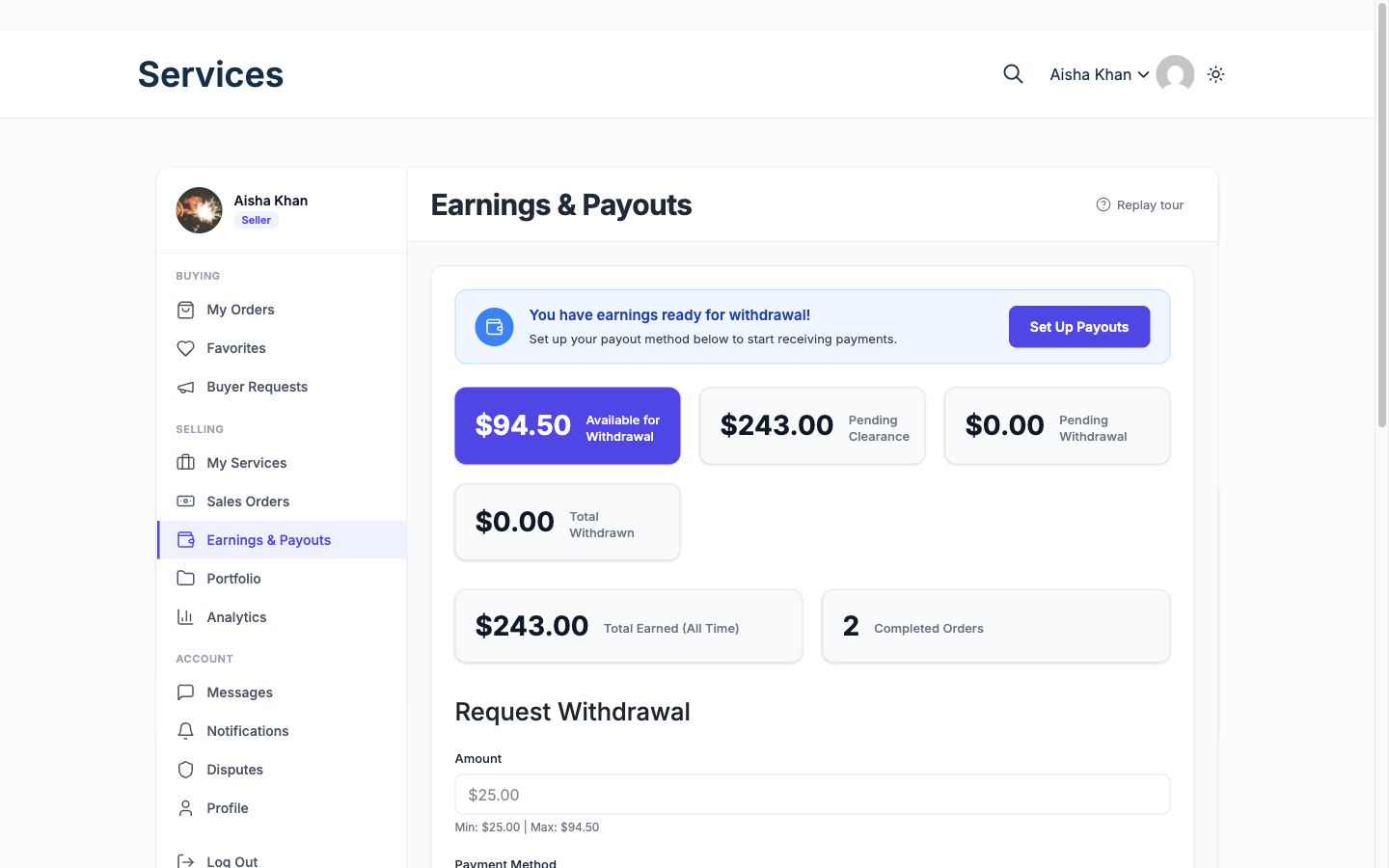
The payout screen your vendors use

/dashboard/earnings/
The Earnings and Payouts screen, showing available balance, pending clearance, total earned and a withdrawal request form.
What a vendor sees when they come to get paid. Cleared, still clearing, and a request form bounded by the minimum and the balance you set.

Money path, buyer to vendor

  1. Buyer pays Through your checkout, or the cart platform you already run.
  2. Commission splits A global rate from 0 to 50 percent, with per-vendor overrides. With Pro tipping, tips can carry their own rate.
  3. Vendor balance clears After the clearance period you set.
  4. Vendor requests a withdrawal Subject to your minimum amount.
  5. You approve and pay out By hand on free. On Pro, Stripe Connect pays the vendor at the moment of sale, and PayPal Payouts sends everyone owed in one batch you trigger.

26 capabilities that matter to you, across 6 areas. Each links to its documentation.

The order workflow

  • Eleven order statuses Free

    A complete lifecycle from payment and requirements through delivery, revision and approval, with on hold, late, disputed and cancelled states for when things go wrong.

    Docs →
  • Order timeline Free

    One merged, chronological history per order, so nobody reconstructs what happened from three separate screens.

    Docs →
  • Offline payment proof Free

    A buyer paying by bank transfer uploads the receipt, and an admin approves or rejects it. Approval marks the order paid and credits the vendor through the same path as a card payment. Off by default.

    Docs →

Trust and reputation

  • Reviews and star ratings Free

    Buyers rate completed orders; ratings drive the catalog and the vendor profile.

    Docs →
  • Disputes Free

    A structured process with evidence from both sides and admin mediation, instead of a refund argument by email.

    Docs →
  • Review moderation Free

    Owners moderate reviews and vendors reply, so one bad review is not the whole story.

    Docs →

Money and payouts

  • Commission system Free

    A global rate from 0 to 50 percent, with per-vendor overrides. With Pro tipping, tips can carry their own rate.

    Docs →
  • Withdrawals Free

    Requests with minimum amounts, clearance periods and owner approval.

    Docs →
  • Earnings ledger Free

    A line-by-line record of every movement. The ledger CSV export is on Pro; the admin Withdrawals CSV is free.

    Docs →
  • Stripe Connect payouts Pro

    Split payments straight to vendor accounts, so the money never queues on your balance.

    Docs →
  • Tiered commission rules Pro

    Rates that vary by category, volume or seller level rather than one flat number.

    Docs →

Running the marketplace

  • Setup wizard Free

    Activation opens a wizard that creates the pages and sets the essentials.

    Docs →
  • Service moderation queue Free

    Approve listings before they publish, or let them go live automatically.

    Docs →
  • Vendor management Free

    Approve, suspend and manage sellers, and decide whether anyone can register.

    Docs →
  • Withdrawal approvals Free

    Payout requests collect on one screen, counted by status.

    Docs →
  • Manual order creation Free

    Owners raise an order on a customer behalf, for deals agreed off-platform.

    Docs →
  • Checkout billing fields Free

    Choose what checkout asks for. Name and email are always collected; the address fields that suit physical goods can be switched off for digital services.

    Docs →
  • Analytics and export Pro

    Revenue and performance dashboards for admins and vendors, exportable as CSV or as a printable report you can save as a PDF.

    Docs →

Building on it

  • Six Gutenberg blocks Free

    Service grid, featured services, categories, search, seller card and buyer requests, for the block editor.

    Docs →
  • Twenty shortcodes Free

    The same surfaces for Elementor, Bricks and classic themes, from the catalog to the dashboard.

    Docs →

Presentation and SEO

  • SEO and schema markup Free

    Service pages are described as products, so search engines can read price and rating.

    Docs →
  • In-app notifications Free

    A notification centre in the dashboard, separate from email.

    Docs →
  • 29 switchable email types Free

    Every stage has a templated email in HTML and plain text, each with its own on/off switch. Members see only the categories their role uses: five for a buyer, eight for someone who also sells.

    Docs →
  • Push notifications to phones Pro

    The events a member already gets in the app can reach their phone, on Android and iOS, using your own Firebase credentials. Off by default.

    Docs →
  • White-label branding Pro

    Rebrand the marketplace as yours and remove every mention of ours.

    Docs →
  • Display currency Pro

    An approximate price in the shopper currency appears beside the real one, detected from their timezone, while you still settle in yours.

    Docs →