Withdrawal Requests & Methods
Earnings & WalletWhen vendors are ready to get paid, they submit a withdrawal request from their dashboard. Here is how the entire process works -- from request to payment.
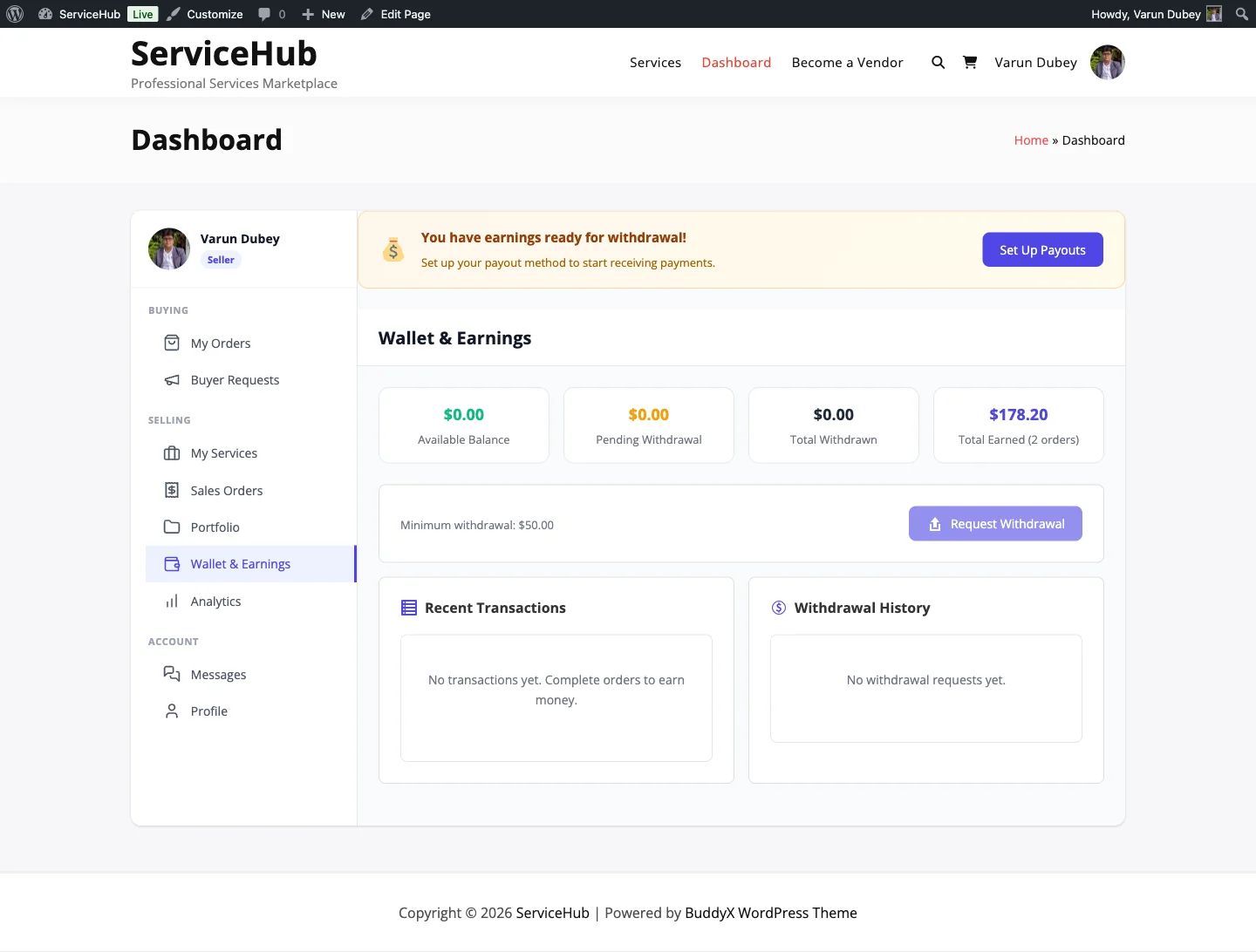
How Withdrawals Work#
- Vendor earns money -- orders are completed and earnings pass the clearance period
- Vendor requests withdrawal -- picks an amount and payment method
- Admin reviews -- approves or rejects the request
- Admin sends payment -- processes payment via bank transfer or PayPal
- Vendor gets paid -- funds arrive in their account
Minimum Withdrawal Amount#
Vendors must have a minimum balance before they can request a withdrawal. The default minimum is $25, but you can change this in Settings > Payouts.
If a vendor's available balance is below the minimum, the withdrawal button is disabled and they see how much more they need to earn.
Withdrawal Methods#
Vendors choose how they want to be paid when they submit a request:
Bank Transfer#
- Vendor provides: bank name, account holder, account number, routing/sort code
- Processing time: 3-7 business days
- Usually free for domestic transfers
- Best for regular, larger withdrawals
PayPal#
- Vendor provides: their PayPal email address
- Processing time: 1-3 business days
- Best for international vendors or quick payouts
How Vendors Request a Withdrawal#
From the vendor dashboard:
- Go to the Earnings & Payouts section
- Check the available balance (must meet minimum threshold)
- Click Request Withdrawal
- Enter the amount (or click Withdraw All for the full balance)
- Select payment method: Bank Transfer or PayPal
- Fill in that method's details. PayPal needs your PayPal email; a bank transfer needs the account holder, bank name and account number or IBAN (routing, SWIFT or IFSC is optional)
- Review and click Submit Request
The details you enter are saved as your payout profile and filled in next time, so you only change them when your account changes. A request without complete details for its method is refused, so the site owner is never handed a payout with nowhere to send it. The admin withdrawals screen shows each request's full destination.
You can cancel a request while it is still Pending with Cancel in your withdrawal history; the amount goes straight back to your available balance.
The vendor sees a confirmation with a request ID and status. They also receive an email confirming the submission.
Withdrawal Statuses#
| Status | What It Means |
|---|---|
| Pending | Request submitted, waiting for admin review |
| Approved | Admin approved it, payment is being processed |
| Paid | Payment has been sent to the vendor |
| Rejected | Request denied -- funds return to vendor's available balance. The note the admin typed shows under the badge as "Reason: ..." and is in the email |
The typical flow is: Pending > Approved > Paid
If rejected, the funds go right back to the vendor's balance so they are not lost.
What Admins Do#
See the full admin workflow in Withdrawal Approvals. In short:
- Go to Sell Services > Withdrawals
- Review pending requests (vendor info, amount, payment details)
- Approve the request
- Process payment externally (send the bank transfer or PayPal payment)
- Return to the request and click Mark paid
Admins can also Reject a request with a reason if something is wrong (incomplete payment details, outstanding disputes, etc.).
Withdrawal History#
Vendors can see all their past withdrawal requests in Dashboard > Earnings & Payouts, including:
- Request ID and amount
- Payment method used
- Current status
- Date requested and date processed
- Any admin notes
Clearance Period#
After an order is completed, your marketplace may apply a clearance period before those earnings can be withdrawn. It ships at 0 days, so unless your admin raised it, earnings are withdrawable straight away. When it is set, it protects against:
- Late buyer disputes
- Chargebacks from payment processors
- Quality issues discovered after delivery
Admins can adjust the clearance period (0-90 days) in Settings > Payouts.
If Your Balance Is Below Zero#
A refund or dispute can return money to a buyer after you were already paid. Your balance then reads below zero. Nothing is taken from you: your next earnings pay it down first, and withdrawals resume once the balance is positive again. You cannot request a withdrawal while it is below zero.
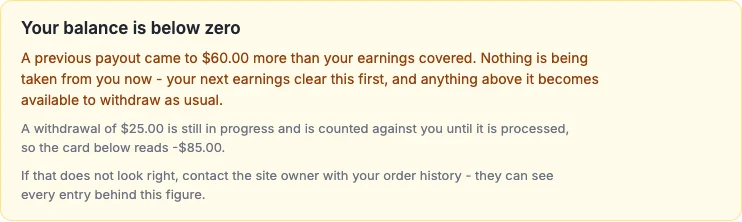
The notice states how much a previous payout exceeded your earnings. If a withdrawal is still in progress it is counted against you until it is processed, and the notice says so. The site owner can see every ledger entry behind the figure and can write the amount off, which brings your balance back to zero.
Common Questions#
"Why can't I withdraw?" Check that your available balance meets the minimum threshold and that you do not already have a pending withdrawal request.
"My request was rejected -- what now?" Check the rejection reason (visible in your withdrawal history), fix the issue (usually incomplete payment details), and submit a new request.
"How long until I receive payment?" After admin approval, bank transfers typically take 3-7 business days and PayPal takes 1-3 business days.
Related Docs#
- Earnings Dashboard -- Tracking vendor income
- Commission System -- How earnings are calculated
- Automated Payouts -- Schedule automatic withdrawals
- Withdrawal Approvals -- Admin processing guide