Milestone Contracts
Order ManagementMilestone contracts break a custom project into paid phases. The vendor proposes the plan, the buyer approves it as a whole, then the buyer pays and approves each phase one at a time. It's the right fit for larger, scoped work where neither side wants to commit the full amount up front.
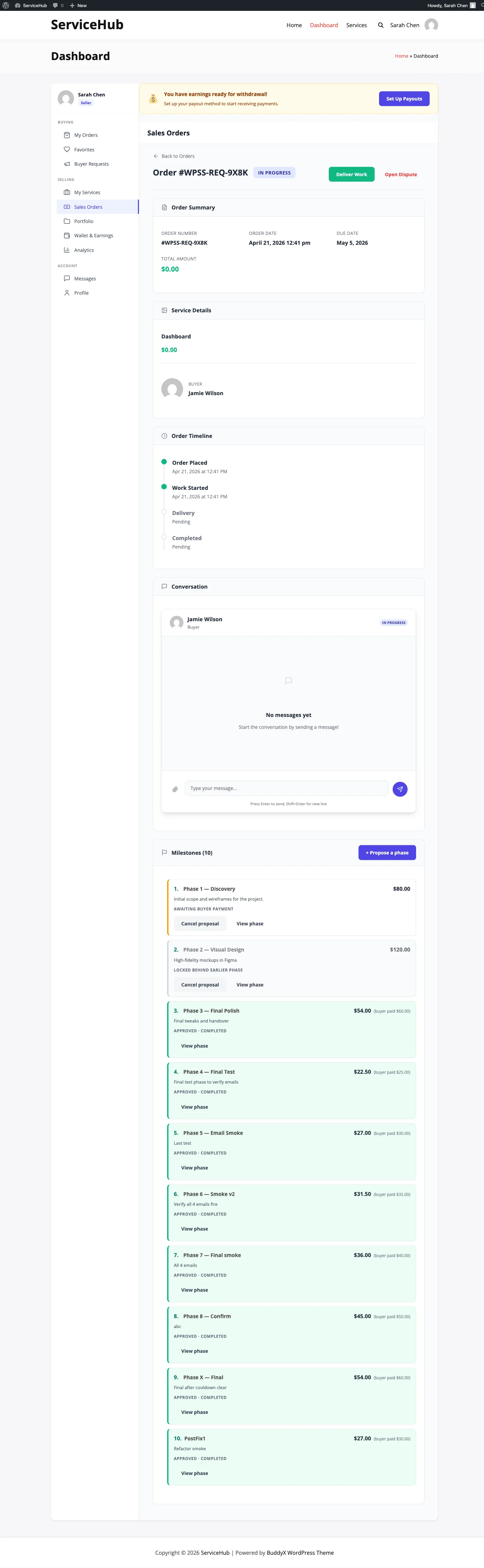
When to use a milestone contract#
Milestone contracts live on buyer-request orders only - projects that started with a buyer posting a brief and a vendor responding with a custom proposal. For a fixed-price catalog service, use a Paid Extension instead. The two features are mutually exclusive - a single order will only ever show one or the other.
Milestone contracts work well when:
- The project is large or open-ended (website build, editing a book, a phased consulting engagement).
- The work divides cleanly into stages that each deliver something the buyer can review.
- Both sides want progress payments rather than a lump sum upfront or everything at the end.
The vendor journey#
Proposing a milestone contract at proposal time#
When you reply to a buyer request, choose Milestone as the contract type on the proposal form. You'll see a repeater where you enter each phase:
- Title - a clear name the buyer will recognise (e.g. "Homepage wireframes").
- Description - what's delivered at the end of this phase.
- Amount - what the buyer pays for this phase.
- Days - how many days this phase takes.
The total of the phases is what the buyer sees as the project total. There's no separate upfront fee - the parent order's base price is $0, and all money flows through the phase payments.
Once you submit, the buyer can compare your proposal against others, expand the phase list, and review the full breakdown before accepting.
Adding ad-hoc phases later#
Custom projects often grow. After the contract is under way you can still propose additional phases from the order page with the + Propose a phase button. A later addition is treated the same way as any predefined phase - the buyer pays, you deliver, the buyer approves.
Ad-hoc phases expire; contract phases do not. A phase you add mid-project is cancelled automatically if the buyer has not paid it within 48 hours. Phases that came from the original accepted proposal are exempt and wait indefinitely. See The 48-hour abandon sweep.
Locked and closed phases#
A phase stays locked until the previous phase is approved. Its page says so instead of offering a Pay button. A phase that was declined or deleted can no longer be paid, and on a store checkout its pending store order is cancelled. A payment that arrives for a closed order is not applied; it is logged so you can refund it.
Delivering a phase#
When the buyer pays a phase:
- You receive an email and in-app notification to start work.
- The phase moves to In progress.
- When you're done, hit Submit Delivery on that phase row. Attach files or notes the buyer needs.
- The phase moves to Awaiting approval.
- On approval, your earnings for the phase are credited to your wallet. Until then they show as Clearing on your earnings page: the buyer has paid, but a phase is earned when it is approved, the same as an order on completion. A phase completed another way (a dispute ruling or an admin) is credited the same way, once.
If the buyer wants changes, the phase comes back to you marked Changes requested - over to you, with their notes on the phase and in the order conversation. Fix the work and use Resubmit delivery; the phase returns to awaiting approval.
Revisions on a phase aren't counted against the main order's revision limit - a phase carries no revision allowance of its own, so there is no counter to run down.
The buyer journey#
Reviewing a milestone proposal#
On the buyer-request page, milestone proposals are tagged with a small
badge (3 phases · $500) next to the total. Expanding the proposal
shows the phase list with titles, amounts, and days. You see the whole
plan before accepting, so nothing is a surprise later.
Accepting a milestone contract#
When you accept, the order is created with all phases pre-populated in the timeline and the project kicks off. You don't pay the base of the order - it's $0 by design. Money only moves when you pay individual phases.
The lock-step rule, and where it actually holds#
The lock-step rule is the key thing to understand about milestone contracts:
Phase N only becomes payable once every earlier phase has finished - approved, declined, cancelled, or swept away unpaid.
So on a 3-phase contract, phase 1 is payable immediately. Phases 2 and 3 show a disabled "Locked - pay phase 1 first" pill. This keeps both sides in rhythm - the vendor isn't working on multiple phases in parallel with no payment history, and you aren't stacking up prepayments on phases you haven't seen yet.
Paying a phase does not unlock the next one. A paid phase is In progress, which still counts as open. Phase 2 unlocks when phase 1 is approved (or declined, or cancelled) - not when it is paid. Only one phase is ever in flight at a time, by design.
Where the rule is enforced - and where it is not
This matters if you are choosing a payment platform, and it is the part most easily mis-stated. The lock is enforced at checkout entry points on the standalone rail and on the two REST pay endpoints:
| Entry point | Locked phase refused? |
|---|---|
| The order page pay button (any rail) | Yes - the button is disabled |
POST /orders/{id}/pay, POST /milestones/{id}/pay |
Yes - HTTP 409 wpss_milestone_locked |
Standalone checkout via ?pay_order=N |
Yes - shows a notice instead of the form |
| Standalone Stripe and Razorpay intents | Yes - wpss_phase_locked |
| WooCommerce order-pay URL | No |
| FluentCart checkout URL | No |
POST /payments/create-intent / /payments/confirm with pay_order |
No |
| PayPal's direct create-payment path | No |
On both store rails the pay-order URL is generated by a resolver that checks
only "is this unpaid?" - WCPayOrderResolver and FluentCartPayOrderResolver
share that one test - so a determined buyer who has the URL for a later phase
can pay it out of order, and the payment settles normally.
Treat lock-step as a workflow rail that keeps honest buyers in sequence,
not a security control. If sequencing must be enforced absolutely, run on
standalone.
(All ownership checks are enforced everywhere: only the buyer on the order can pay it, on every rail.)
Approving deliveries & requesting revisions#
When the vendor submits a phase you get two actions on it: Approve delivery and Request changes.
Approve it and the next phase unlocks. Choose Request changes and you are asked what needs changing; the phase goes back to the vendor marked Sent back to your vendor, your notes appear on the phase, and the same notes are posted into the order conversation labelled with the phase name. A phase has no conversation of its own, which is why they land on the parent contract's thread - where the vendor is already reading.
Only you can send a phase back, and only while it is awaiting your approval. An approved phase is final; if something is wrong after that, open a dispute.
Where you actually click#
A milestone contract lives in the WPSS Dashboard, not in your store's order screens. The whole run, start to finish:
| # | Who | Where | Action |
|---|---|---|---|
| 1 | Buyer | Buyer Request | Accepts a proposal whose contract type is Milestone |
| 2 | Vendor | Dashboard → Sales Orders → the order | Propose a phase (title, amount, days) |
| 3 | Buyer | Dashboard → My Orders → the order → timeline | Pay on that phase |
| 4 | Vendor | Same order, same phase | Works, then Submit Delivery |
| 5 | Buyer | Same phase | Approve - which unlocks the next phase |
Repeat 2-5 per phase. Only one phase is payable at a time: the next stays Locked until the current one is approved or cancelled.
Where it is not: milestone phases never appear in WooCommerce → My Account → Orders as something to act on. That screen is a payment receipt. The work is managed in the Dashboard.
What your site needs for phase payments#
Milestone contracts require the site to run Standalone WPSS payments or WooCommerce. Those are the two setups phase payment is built and tested against.
| Site setup | Phase Pay |
|---|---|
| Standalone WPSS payments | Supported |
| WooCommerce | Supported - a real WooCommerce order is created for the phase, so the Pay link keeps working even from an email days later |
If your marketplace runs on another ecommerce platform, use Extensions for extra paid work instead, or ask the site owner about milestone support.
Site owners set this at WP Sell Services → Settings → General → Ecommerce Integration.
Project completion#
When the last open phase reaches a terminal state, the whole project flips to Completed automatically. Both parties receive the standard order-completed email, a "Project complete" summary card appears at the top of the timeline showing total phases paid and total spent, and the Rate Your Experience CTA goes out to the buyer. The same completion hooks run as for any other order type - vendor stats update, seller-level progress ticks up, and the order moves to completed archives.
"Terminal" includes declined, not only approved. If the buyer declines the final phase, the project still completes. That is deliberate: with every other phase settled, a buyer refusing to fund one more phase means the engagement is over, and leaving the order open forever would strand both parties. But it does mean "Completed" on a milestone project reads as "nothing left outstanding", not necessarily "everything was delivered". Check the phase list, not just the order status.
Two ways a project does not auto-complete, worth knowing:
- The vendor deletes the last unpaid phase. The phase is cancelled, but the completion check does not re-run, so the parent stays open until something else is approved or declined.
- The last phase is swept by the 48-hour abandon job. Same reason.
In both cases the order can still be completed by hand from the order page.
The 48-hour abandon sweep#
A daily background job cancels ad-hoc phases that have sat unpaid for more than 48 hours.
| What it targets | Phases in Awaiting payment, created more than 48 hours ago |
| What it does | Sets them to Cancelled. The row is kept, not deleted |
| What it skips | Contract phases - anything that came from the original accepted proposal. Those wait indefinitely |
| How often | Once a day |
| Who is told | Nobody. No email, no in-app notification, no timeline entry |
This is the behaviour most likely to surprise you, so state it plainly:
- Vendors - a phase you add mid-project is a 48-hour offer. If the buyer hasn't paid by then it disappears from their list without either of you being told. If the buyer still wants it, propose it again.
- Buyers - if a phase you meant to pay has vanished, it most likely expired. Ask the vendor to re-propose it; nothing was charged.
Because a cancelled phase counts as finished, an abandoned phase also unlocks the phase after it.
Cancelling a milestone contract#
Cancellation rules follow what's actually fair for split-phase work:
- Paid and approved phases stand. Those payments are earned and stay with the vendor.
- Unpaid phases are auto-cancelled when the parent is cancelled - no money has moved so there's nothing to unwind.
- Paid but still open phases (the vendor is mid-work or the delivery is awaiting your approval) have not been credited to the vendor yet, and don't cancel automatically. They route through the dispute flow so both parties can agree on what's fair (full or partial refund, extra revision, or mutual agreement that the work delivered was complete).
This matches how phased contracts work in the real world - completed phases are settled, in-flight phases need to be talked through.
When something is refused#
Milestone actions are guarded on the server, and the guards are strict.
Most "why can't I click this?" reports are one of the rows below rather
than a fault. Developers: the code column is the machine-readable
code in the REST error body - branch on it, never on the message.
Proposing a phase#
| Refused when | Code | HTTP |
|---|---|---|
| Title is empty | wpss_milestone_propose_failed |
400 |
| Amount is missing, zero, or negative | rest_invalid_param / wpss_milestone_propose_failed |
400 |
| The parent order does not exist | wpss_milestone_propose_failed |
400 |
| You are not the vendor on the parent order | wpss_milestone_propose_failed / wpss_forbidden |
400 / 403 |
| The order is not a custom project. Milestones exist on buyer-request orders only | wpss_milestone_propose_failed |
400 |
| The parent order is finished, cancelled or still awaiting payment | wpss_milestone_propose_failed |
400 |
| The database write failed | wpss_milestone_propose_failed |
400 |
Paying a phase#
| Refused when | Code | HTTP |
|---|---|---|
| No such phase, or the id is not a milestone | wpss_milestone_not_found |
404 |
| The phase is not awaiting payment (already paid, declined, cancelled) | wpss_milestone_not_payable |
409 |
| An earlier phase is still open | wpss_milestone_locked |
409 |
| Same, on the standalone Stripe/Razorpay path | wpss_phase_locked |
400 |
| You are not the buyer on the order | wpss_forbidden |
403 |
Submitting a delivery#
| Refused when | Code | HTTP |
|---|---|---|
| Not a milestone row | wpss_milestone_not_found |
404 |
| You are not the vendor | wpss_forbidden / wpss_milestone_submit_failed |
403 / 400 |
| The phase is not paid yet, or is already complete | wpss_milestone_submit_failed |
400 |
Approving a delivery#
| Refused when | Code | HTTP |
|---|---|---|
| Not a milestone row | wpss_milestone_not_found |
404 |
| You are not the buyer | wpss_forbidden / wpss_milestone_approve_failed |
403 / 400 |
| The phase is not awaiting your approval | wpss_milestone_approve_failed |
400 |
Declining or cancelling a phase#
| Refused when | Code | HTTP |
|---|---|---|
| Not a milestone row | wpss_milestone_not_found |
404 |
| Already paid. A paid phase cannot be declined - open a dispute instead | wpss_milestone_not_declinable |
409 |
| Already paid, on the vendor's cancel action | wpss_milestone_not_cancellable |
409 |
| You are neither the buyer nor the vendor | wpss_forbidden |
403 |
| The underlying write failed | wpss_milestone_decline_failed / wpss_milestone_cancel_failed |
400 |
Refusals on every milestone route#
| Refused when | Code | HTTP |
|---|---|---|
| Not signed in | rest_not_logged_in |
401 |
| Too many write requests in a short window | rate_limited |
429 |
| The parent order does not exist | wpss_order_not_found |
404 |
| You are not a party to the order | wpss_forbidden |
403 |
Things that fail silently, by design. Approving a phase twice, or completing it by approval and again by a ruling, does not double-credit the vendor: the crediting step recognises the existing wallet entry and does nothing. A payment notification that arrives twice does not start the phase twice. A zero-value phase, or one whose commission leaves nothing for the vendor, records no wallet entry either. None of these surface an error, because in each case the correct outcome already holds.
Differences from catalog extensions#
| Milestone contract | Paid extension | |
|---|---|---|
| Where it lives | Buyer-request orders only | Catalog (fixed-price) orders only |
| Who sets it up | Vendor at proposal time (+ ad-hoc later) | Vendor, on an already-paid order |
| What it charges for | The whole project, split into phases | Extra work on top of the already-paid scope |
| Payment order | Lock-step (phase N must finish before N+1 unlocks) | Single quote, accept or decline |
| Terminal state | Every phase terminal - approved, declined or cancelled | Quote paid or declined |
Tips#
For vendors:
- Keep phases deliverable - each one should produce something the buyer can look at and sign off. Three to five phases works well for most projects.
- Price phases independently. Don't save a "big" phase for the end - you want steady payments, not a back-loaded risk.
- Communicate in the order chat as you work. The timeline shows state; the chat shows context.
For buyers:
- Read the full phase breakdown on the proposal before accepting. What looks clear at proposal time is what you're committing to for the whole project.
- Approve promptly once you're satisfied with a phase. Approval unlocks the next phase - stalling one holds the whole contract.
- Use the chat for revision requests. It keeps a record and avoids a separate reject status.
Related documentation#
- Paid Extensions
- WooCommerce Checkout - paying a milestone, tip or extension - which platforms can take a phase payment at all
- Proposal Contracts (Fixed vs Milestone)
- Order Lifecycle & 11 Statuses
- Deliveries & Revisions