Display Currency
Payments & Checkout proPro feature. Available in WP Sell Services Pro.
Show shoppers an approximate price in their own currency while your marketplace keeps one authoritative base currency for everything it stores and settles.
This is a display-only hint. Orders, earnings, commission, refunds, and payouts are always calculated and recorded in your base currency. Nothing about the stored price changes -- only what a visitor sees while browsing.
Why display-only#
A marketplace that genuinely stored prices in many currencies would have to reconcile exchange-rate movement on every order, refund, and payout: a vendor could be paid at one rate and refunded at another, and the ledger would drift.
Keeping one base currency and treating other currencies as a browsing hint keeps the money math correct and auditable, while still meeting shoppers in their own currency. Because the base amount is the amount charged, there is no rounding drift between the price a shopper sees at checkout and the amount they pay.
Setup#
- Sign up at openexchangerates.org and copy your App ID. The free tier is enough for a typical marketplace.
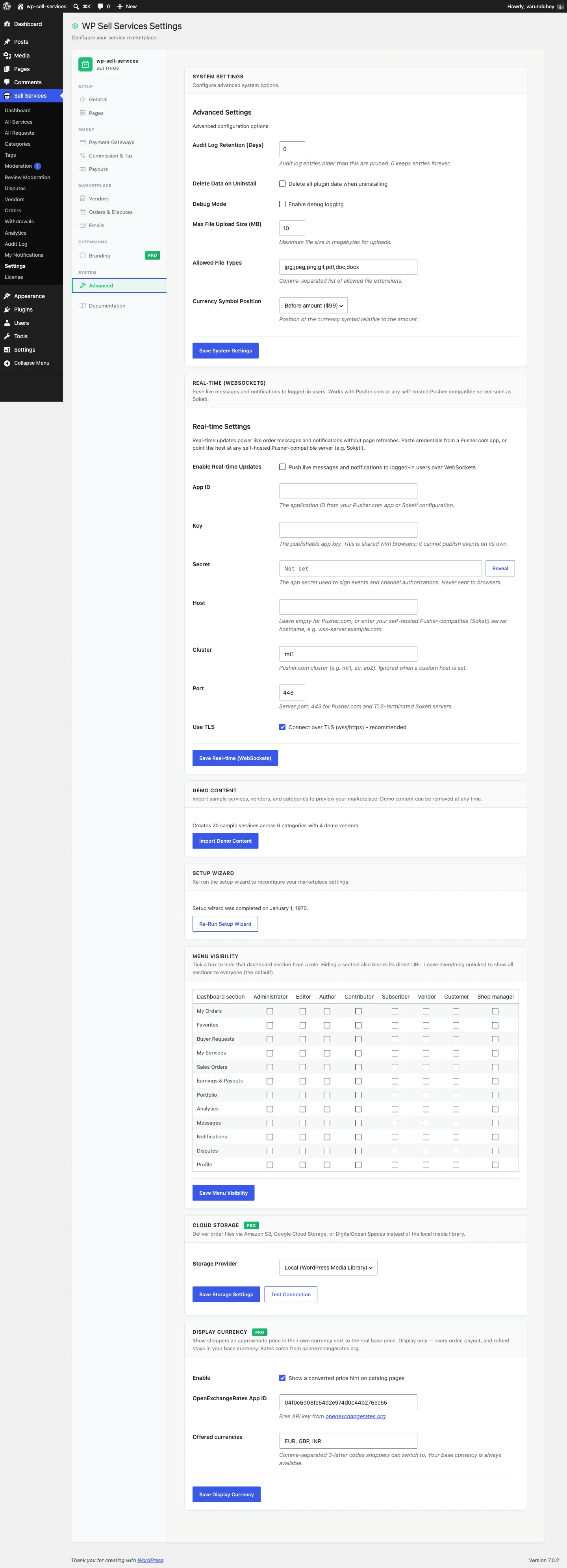
- Go to Sell Services > Settings > Integrations and find the Display Currency card.
- Tick Enable, paste your App ID, and list the currencies you want to offer.
- Save.
The converted hint then appears on catalog price displays automatically, through
the free plugin's wpss_catalog_price_html seam. No template edits are
required -- if your theme renders prices through the plugin's price helper, it
picks this up for free.
What the shopper sees#
- Catalog and service pages show the converted price alongside the real base price.
- Their choice is remembered in a
wpss_display_currencycookie, so it persists across pages. - Checkout always shows and charges the base-currency amount.
The currency is detected from the shopper's timezone, so there is no picker by default: a picker would suggest the shopper is charged in that currency, and they are not. If you still want an opt-in selector, add it anywhere with the shortcode:
[wpss_currency_switcher]
Drop it in a header, sidebar, or the top of your services page.
Exchange rates#
Rates come from openexchangerates.org and are cached for 12 hours. If a fetch fails (bad key, API down, network error), the failure is cached for only 15 minutes so a temporary outage does not leave you with stale rates for half a day, and a broken key does not hammer the API on every page load.
If rates cannot be fetched at all, the hint simply does not render -- shoppers still see correct base-currency prices. The feature degrades quietly rather than showing a wrong number.
Where the hint appears#
Buyer-facing prices carry it:
- service cards and the package tiers on a service page
- buyer request budgets, on the request archive, the single request, and the buyer's own dashboard list
- proposal prices, milestone phase amounts, and a proposal's project total
- cart line items, add-on prices, the cart subtotal and total
Deliberately left in base currency: vendor earnings and sales screens, admin screens, and every email. Those show money that has already moved, or is owed to a vendor in your base currency. A converted figure there reads as though the amount itself changed, which is the opposite of helpful when someone is checking what they were paid.
Things to know#
- Changing the currency list or App ID flushes the rate cache immediately.
- The hint is frontend-only. Admin screens, invoices, and exports stay in base currency.
- This is not multi-currency pricing. Vendors set one price, in your base currency. If you need genuinely separate per-currency price points, that is not what this feature does.
Related#
- Currency, Tax & Gateway Configuration -- setting your base currency
- Commission System -- how the split is calculated
- Shortcodes Reference