Dispute Process & Evidence
Disputes & ResolutionOnce a dispute is opened, it moves through a series of stages until the admin reaches a resolution. Here is what to expect at each step and what you can do along the way.
Dispute Stages#
Every dispute follows this path:
Open > Pending Review > (Escalated) > Resolved > Closed
Not every dispute goes through escalation -- that stage is only for complex cases.
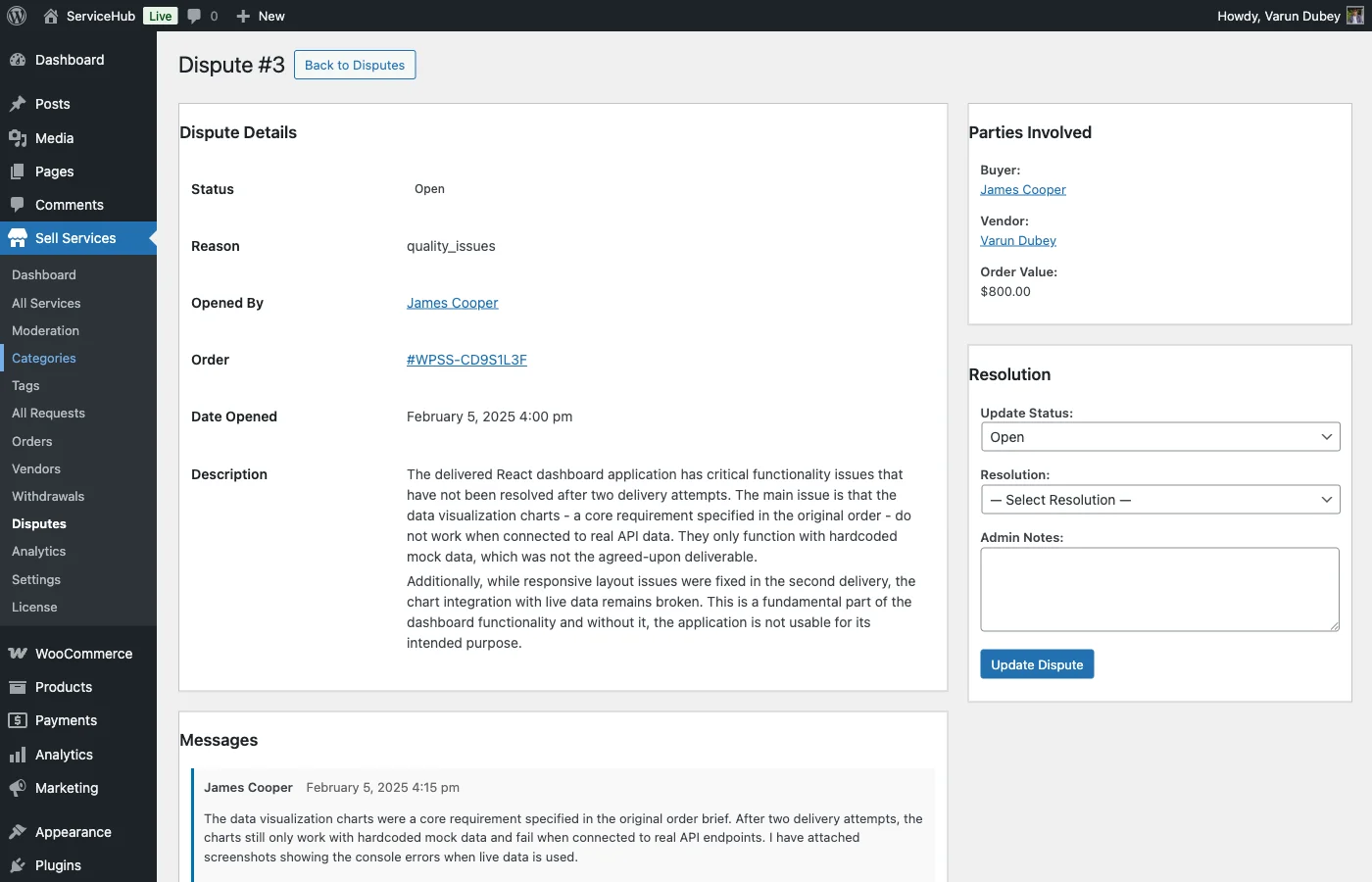
Stage 1: Open#
The dispute has just been submitted. The other party (buyer or vendor) is notified and has a chance to respond. Both sides can add evidence, send messages, and make their case.
What you should do: Make sure all your evidence is submitted. Respond to anything the other party raises. This stage typically lasts 1-3 days.
Stage 2: Pending Review#
Both parties have had their say and the admin is now reviewing everything. The dispute is queued for investigation.
What you should do: Wait for the admin to begin their review. You may be asked clarifying questions -- respond to those promptly.
Stage 3: Escalated (If Needed)#
Some disputes are more complex and need extra attention. The admin may escalate a dispute when:
- The order value is high.
- The evidence is conflicting.
- A policy interpretation is needed.
- Standard resolution options do not fit the situation.
What you should do: Be patient -- thorough investigation takes time. Respond quickly if the admin asks for additional information.
Stage 4: Resolved#
The admin has made a decision. The resolution is being applied -- refunds are processed, order status is updated, and both parties are notified of the outcome.
Stage 5: Closed#
Everything is finalized. The dispute is closed and no further action is possible. The resolution has been implemented and the order status reflects the outcome.
Response Times#
| Who | Action | Timeframe |
|---|---|---|
| Other party | Respond to initial dispute | 48 hours |
| Both parties | Submit all evidence | Before admin review begins |
| Admin | Begin review | 1-3 business days |
| Admin | Complete investigation | 3-7 business days |
| Both parties | Respond to admin questions | 48 hours |
These are typical timelines. Complex disputes may take longer.
What You Can Do at Each Stage#
While the dispute is Open:
- Add evidence (text, screenshots, links, files).
- Send messages in the dispute thread.
- View all evidence from both sides.
- Respond to the other party's claims.
During Pending Review and Escalation:
- View everything that has been submitted.
- Respond to any questions from the admin.
- You generally cannot add new evidence at this point.
After Resolution:
- View the admin's decision and reasoning.
- Confirm receipt of any refund.
- Leave a review if you have not already.
After Closure:
- The dispute is final. It cannot be reopened.
Communication During Disputes#
Disputes have their own message thread, separate from the regular order messages. Both the buyer, vendor, and admin can see everything posted here.
Good communication practices:
- Stay professional and factual.
- Focus on the specific issue at hand.
- Respond promptly when the admin asks questions.
- Avoid aggressive language or personal attacks.
How the Order Is Updated#
When the admin resolves a dispute, the order status is updated automatically:
| Resolution | Order Becomes |
|---|---|
| Full Refund or Favor Buyer | Refunded |
| Partial Refund | Partially Refunded |
| Favor Vendor or Mutual Agreement | Completed |
Important Things to Know#
- One dispute per order. You cannot open a second dispute on the same order, but you can add evidence to the existing one.
- Both sides can open disputes. Either the buyer or the vendor can initiate the process.
- No auto-resolution. An admin must make the final decision -- disputes never resolve on their own.
- Evidence is permanent. Once evidence is added, it becomes part of the dispute record and cannot be removed.
- Disputes can be filed at any time while the order is active, though filing sooner is always better.
What Happens After#
Once a dispute is resolved and closed:
- Any refund is processed automatically -- the buyer is refunded through the original gateway and the vendor's earnings are reversed. The admin does not refund again by hand.
- The vendor's dispute history is tracked. Multiple disputes can affect a vendor's standing on the marketplace.
- Both parties can leave reviews (if they have not already).
- Life goes on. Learn from the experience and move forward.