Posting a Buyer Request
Buyer Requests & ProposalsBuyer requests let you describe exactly what you need and have vendors come to you with offers. Think of it like posting a job listing -- you set the brief, and qualified vendors pitch their services.
What Are Buyer Requests?#
Instead of browsing services, you flip the script. Post a description of your project, set your budget, and let vendors compete for your business. You will receive proposals with pricing, timelines, and cover letters explaining why each vendor is the right fit.
How the process works:
- You post a request describing your project
- Vendors browse open requests and submit proposals
- You compare proposals side by side
- You accept the best one -- an order is created automatically
- The standard order workflow begins
How to Post a Request#
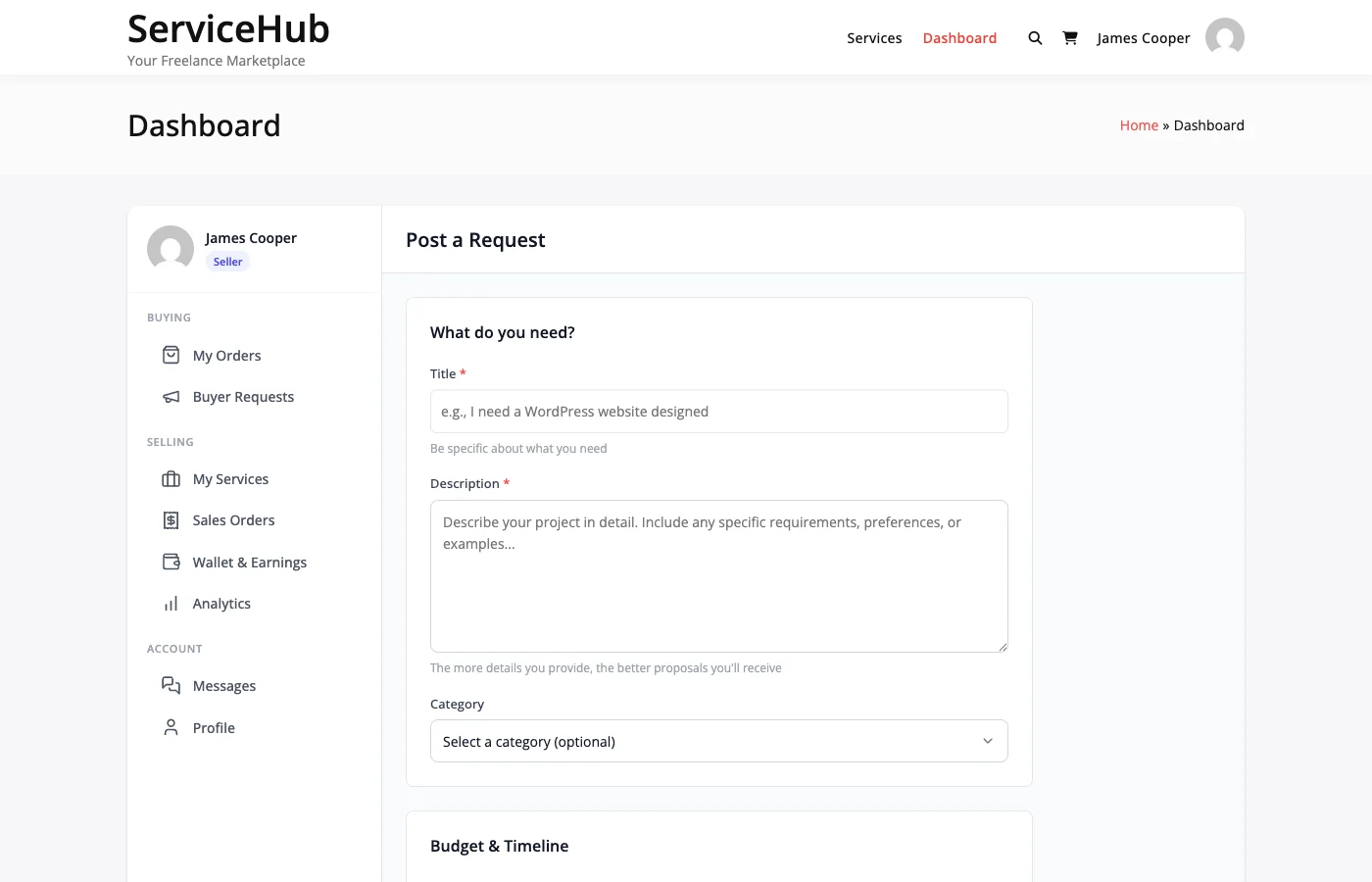
Go to Dashboard > Buyer Requests and click Post New Request. Fill out the form with these details:
Title#
Give your project a clear, descriptive title. Good titles attract better proposals.
- "Logo Design for Tech Startup -- Modern and Minimalist" (good)
- "Need help" (too vague -- vendors will skip it)
Description#
Explain what you need in detail. The more specific you are, the better proposals you will get. Include deliverables, technical needs, design preferences, and anything else a vendor should know before quoting.
Category#
Pick the service category that best matches your project. This helps the right vendors find your request.
Budget#
You can set your budget two ways:
- Fixed price -- A single amount (e.g., "$500")
- Price range -- A minimum and maximum (e.g., "$300 to $500")
Price ranges tend to attract more proposals since they give vendors flexibility.
Delivery Timeline#
How many days do you need the work completed? This is a guideline -- vendors can propose a different timeline in their response.
Skills Needed#
List specific skills or technologies the project requires (e.g., "WordPress", "Logo Design", "React"). This helps vendors decide if they are a good fit.
Attachments#
Upload reference files, mockups, design briefs, or any documents that help explain what you need.
Each file uploads as soon as you pick it. Request files are visible to vendors browsing your request, so do not attach anything private.
After You Post#
Once your request is live:
- Vendors are notified and can browse your request
- Proposals arrive with pricing, timelines, and cover letters
- You get notified by email and in-app each time a new proposal comes in
- Your request stays open for 30 days by default (admin-configurable)
Request Expiry#
Requests automatically expire after 30 days if no proposal is accepted. After expiry, the request is hidden from vendors and no new proposals can be submitted. You can repost with updates if needed.
Reviewing Proposals#
Go to Dashboard > Buyer Requests and click on your request to see all proposals. For each one, you will see:
- Vendor profile and ratings
- Proposed price and delivery timeline
- Cover letter explaining their approach
Accepting a Proposal#
When you find the right vendor, click Accept Proposal. Here is what happens:
- An order is created automatically
- All other proposals are declined
- Your request is marked as hired
- You are redirected to checkout to complete payment
- After payment, the vendor starts work
You can only accept one proposal per request. If you need multiple vendors, post separate requests.
Managing Your Requests#
Editing#
You can edit your request (title, description, budget, attachments) at any time while it is still open and no proposal has been accepted.
Attachments follow one extra rule. Until a vendor sends a proposal you can add and remove files freely, and a file you remove is deleted. Once a vendor has sent a proposal, the files already on the request stay: vendors priced their proposals against them. You can still add more files.
Closing#
If you no longer need the work, click Close Request. Pending proposals are notified, and the request is removed from vendor listings.
Reopening#
If your request expires or you close it early, you can repost it with updates to start receiving proposals again.
Tips for Getting Great Proposals#
- Be specific -- List exact deliverables, file formats, and must-haves
- Set a realistic budget -- Research market rates for similar work
- Respond quickly -- Check proposals within a day or two
- Decline what you will not accept -- Keeps your request tidy and respects vendors' time
Common Questions#
Do I pay to post a request? No. Posting requests is free. You only pay when you accept a proposal and complete checkout.
Can I accept multiple proposals? No, only one per request. Accepting one automatically declines the others. Post separate requests if you need multiple vendors.
What if I do not get any proposals? Try increasing your budget, making requirements clearer, or double-checking your category. Give it 3-5 days before reposting.
Can I message vendors before accepting? Not directly through requests, but vendors can include questions in their proposals and you can use the proposal review screen to evaluate fit.